broodParts Lite1.5
Publisher Description
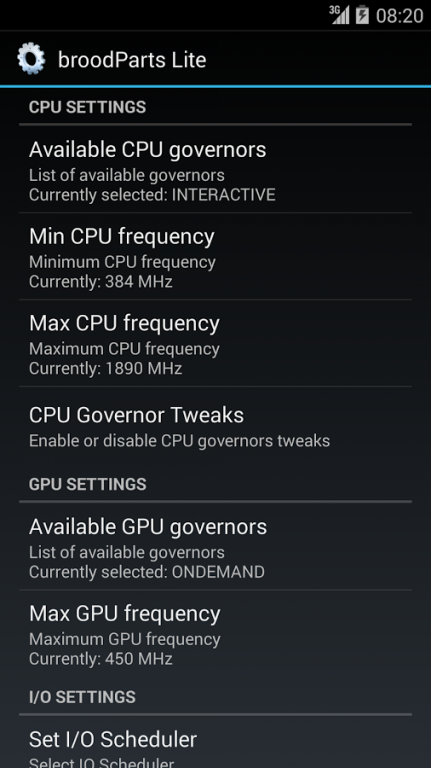
broodParts Lite is an extension for your ROM Settings. It includes the main root functions that you will need in every rooted ROM.
To function properly, broodParts Lite requires:
- Root access (Check the XDA Forum page of your device)
- Init.d support (Check out my "Init.d Toggler" app for enabling init.d on your ROM)
- Busybox (Download from market and install if not sure)
- Custom Kernel (to fully benefit from broodParts Lite you need a custom kernel)
The app includes the following features:
- Set CPU Governor
- Set CPU Min/Max Frequency
- Enable/Disable CPU Governor Tweaks
(Quad core is supported)
- Set GPU Governor
- set GPU Max Frequency
- Set I/O Scheduler
- Set Internal SDCard Read Cache Size
- Set External SDCard Read Cache Size
- Enable/Disable I/O Scheduler Tweaks
- Cleanup RAM and view result
- Enable/Disable ADB Notification Icon
Enjoy! If you encounter any errors please send me a report!
Please note: some settings will only change when you have rebooted your phone (due to init.d execution)
www.broodplank.net
About broodParts Lite
The company that develops broodParts Lite is broodplank. The latest version released by its developer is 1.5. This app was rated by 1 users of our site and has an average rating of 3.0.
To install broodParts Lite on your Android device, just click the green Continue To App button above to start the installation process. The app is listed on our website since 2014-01-16 and was downloaded 28 times. We have already checked if the download link is safe, however for your own protection we recommend that you scan the downloaded app with your antivirus. Your antivirus may detect the broodParts Lite as malware as malware if the download link to com.broodplank.broodpartslite is broken.
How to install broodParts Lite on your Android device:
- Click on the Continue To App button on our website. This will redirect you to Google Play.
- Once the broodParts Lite is shown in the Google Play listing of your Android device, you can start its download and installation. Tap on the Install button located below the search bar and to the right of the app icon.
- A pop-up window with the permissions required by broodParts Lite will be shown. Click on Accept to continue the process.
- broodParts Lite will be downloaded onto your device, displaying a progress. Once the download completes, the installation will start and you'll get a notification after the installation is finished.
Program Details
System requirements
Download information
Pricing
Version History
version 1.5
posted on 2014-01-16
v1.5,- Many compatibility checks (this should fix fc's!),- Fixed init.d script causing bootloop on some devices,v1.4,- Removed MAX API 17 (now available on all versions, API 8+),- Reworked Ram cleaning (Fix FC, add 'kill background services' and change toast messages),- Added GPU Governor / Max Freq options,- Added External SDCard Readahead,- Updated ReadAhead values,- Updated market link from intent
version 1.3
posted on 2013-04-12
Several fixes and updates
